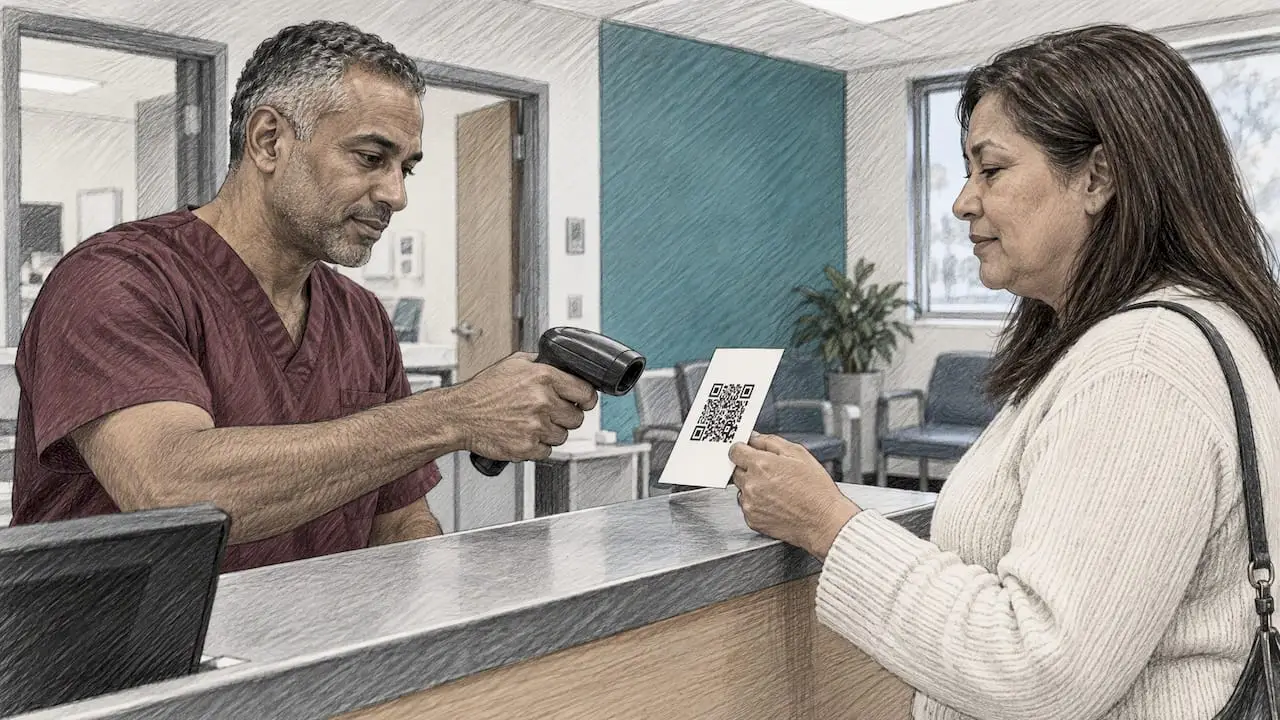
SMART Health Card integration means connecting your records to a standard that produces a signed, patient-held credential, and connecting verifiers that can check that credential. For a health organization, the work comes down to three parts: issuing cards from FHIR data, letting verifiers validate them, and deciding how the cards fit your existing workflows. This guide covers each part in plain terms, with the specifications, tests and privacy limits a program director should know before approving a project.
TL;DR
- A SMART Health Card is a signed, FHIR-based data artifact that a person stores and shows, usually as a QR code. It carries minimal data: name, date of birth and clinical details such as a vaccination or test result.
- Issuing uses a minified FHIR bundle, a compact signature and published public keys. Your IT or EHR vendor builds this, and you can test it against a federal test kit first.
- Verification checks two things: the data is unchanged and the issuer is trusted. Verifiers do not need a connection to your records.
- A card proves a fact. It does not track what happened next. Referrals, follow-up and funder reporting still need a workflow system.
- Decide scope, privacy rules and ownership before the technical work starts.
Table of Contents
- What a SMART Health Card is
- How issuance works technically
- How verification works
- Testing before you go live
- Privacy and security decisions
- SMART Health Cards, SMART Health Links and insurance cards
- Where SMART Health Cards fit in a community health program
- A scoping checklist for program directors
- How WellCheck approaches this
- Common mistakes to avoid
- FAQ
- Sources
What a SMART Health Card is
The SMART Health Cards Framework defines a Health Card as a signed data artifact for health-related details modeled with FHIR, designed for a consumer to store and present. The signature is what makes it useful. Anyone who receives the card can confirm it was issued by a particular organization and has not been edited since.
The standard grew out of COVID-19 vaccination and testing records, and that is still its most common use. The HL7 implementation guide for vaccination and testing describes the FHIR content for infectious disease vaccination records and laboratory testing status. The same product brief notes that SMART Health Cards are built into the iPhone and Android operating systems, which is why many residents can already carry one without installing anything special.
What a card contains
Cards are deliberately small. According to How SMART Health Cards Work, a card holds the person’s legal name and date of birth plus clinical information: for a vaccination, the type, date and location; for a test, the date, manufacturer and result.
For the United States, the SMART Health FAQ says a card should contain only legal name, date of birth and clinical information. Cards issued in other countries may include commonly used identifiers depending on local practice or regulation, so do not copy a foreign example. CommonHealth adds that a card should not carry a phone number, address, government-issued identifier or other health information.
If your program needs more than that, a card is the wrong container. Your own system of record is the right place for the rest.
Three ways a person receives one
The framework says a person can obtain a card as a paper or PDF copy with a QR code, as a .smart-health-card file, or through FHIR API access. Each path has a different effort level for your team:
| Delivery method | Who handles it | Best for |
|---|---|---|
| Printed or PDF QR code | Front desk or portal download | Walk-in clinics, events, residents without smartphones |
.smart-health-card file | Patient portal | People who add the card to a wallet app on their phone |
| FHIR API access | Your FHIR server and a wallet app | Organizations with an API-capable record system |
Most rural programs should start with the first two. The API route gives the smoothest experience for the patient but requires the most from your record system.
How issuance works technically
You do not need to write this code yourself, but you should understand it well enough to ask your vendor the right questions.
Per the framework, an issuer builds a minified FHIR bundle and packages it as a compact JWS, compressed with DEFLATE and signed with an ES256 key. The issuer publishes its public keys in a JWKS (a JSON Web Key Set) at a stable web address. Verifiers use those published keys to check the signature.
Three practical consequences follow:
- Key management is an operational duty. Someone at your organization or vendor must own the signing key, protect it and publish the public key where verifiers can reach it.
- The issuer web address has to stay stable. If it changes, verifiers cannot confirm older cards.
- The data must be clean before it is signed. A card with a wrong date of birth is a signed wrong date of birth. Fix the source record first.
The FHIR issue operation
Organizations that want a wallet app to request credentials directly can offer the $health-cards-issue FHIR operation. The operation definition lets the requester filter by resource type or, optionally, by ValueSet. The framework lists the same operation as the way a Health Wallet asks for credentials, alongside QR code and file download.
The HL7 product brief reports that issuers already include multiple health systems and national pharmacy chains. That matters for a small program: the pattern is proven at scale, and your EHR vendor may already support some of it. Ask the vendor directly whether issuance is available in your current version and what it costs, before you plan any custom build.
How verification works
A verifier scans the QR code with a verifier app. As the SMART Health Cards site explains, the app checks that the information is unchanged and comes from a trusted issuer. The verifier does not call your clinic or open your records. It reads the card and compares the signature with the issuer’s published public key.
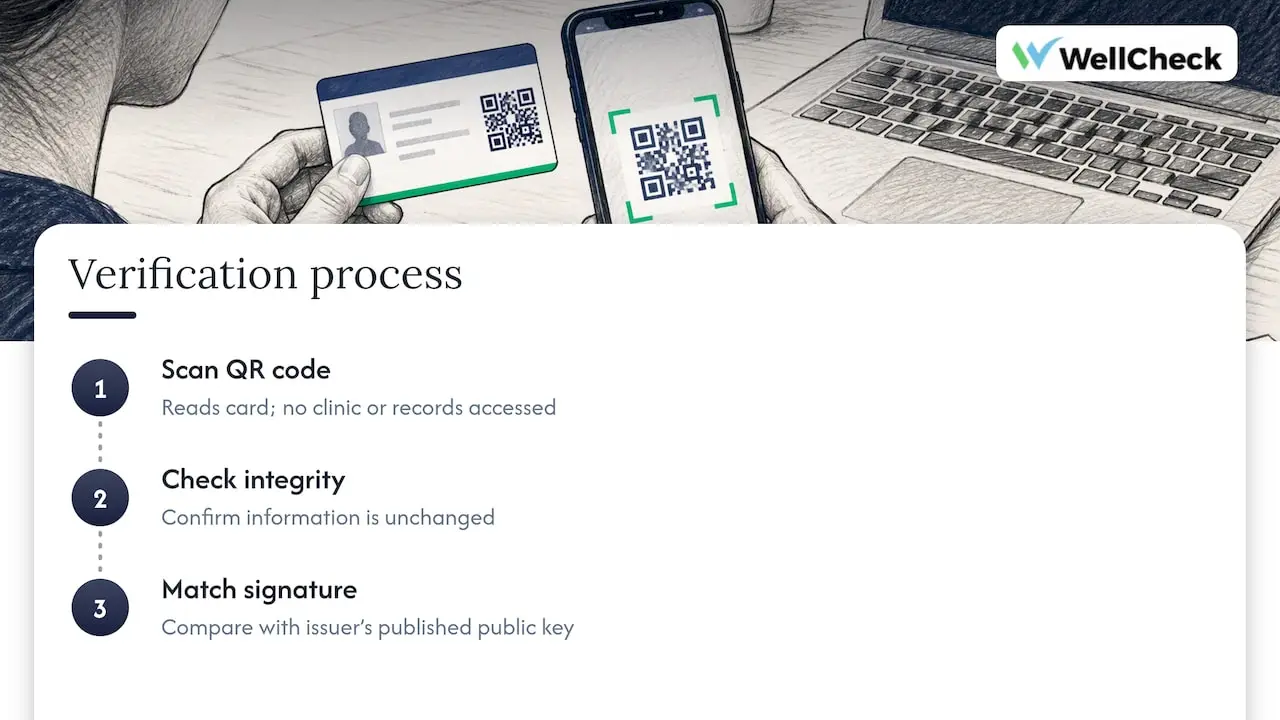
For development, the SMART Health Cards project offers developer and verifier tools on its portals, including a way to generate a card from a FHIR bundle and a way to read a QR image. These are useful for checking your output before real patients rely on it.
The verifier side raises a question most guides skip: who is the trusted issuer? Verification confirms the signature belongs to a key. Whether your organization accepts that key is a policy choice. A county health department, a school district or an employer needs a short, written list of issuers it accepts and a person responsible for updating it.
Testing before you go live
The federal Inferno SMART Health Cards Test Kit on HealthIT.gov lets an organization test file downloads, the FHIR $health-cards-issue operation and QR codes. The Inferno Framework behind it is designed for reuse, so it is meant to make test kits easier to build for other FHIR-based exchanges as well.
A sensible test plan before launch:
- Run the Inferno test kit against your issuing endpoint and fix every failure.
- Issue cards for a small set of test patients with deliberately awkward data: hyphenated names, missing middle names, multiple vaccine doses.
- Scan each card with at least two different verifier apps on both iPhone and Android.
- Print a QR code and scan it from paper, at the size and print quality your front desk will actually produce.
- Confirm that the public key address resolves from outside your network.
- Document who to call when a card will not verify.
Step four catches more problems than people expect. A QR code printed on a low-resolution office printer is the most common real-world failure in paper workflows.
Privacy and security decisions
The standard builds in some protection. The framework states that presentation includes explicit user opt-in, and holders control which data they choose to share for a given use case. Your integration should not undermine that.
The SMART Health FAQ advises people to share a card only with trusted organizations that explain what they intend to do with the data and whether they will keep it. Turn that advice into your own policy if your program ever scans cards:
- State what you scan and why. One sentence at the point of scanning is enough.
- Say whether you keep anything. The simplest policy is to verify and discard.
- Do not add data to the card. Keep to the content limits listed above.
- Train staff on the opt-in. A person handing over a phone is choosing to share, and staff should not ask for more than the use case needs.
- Review HIPAA applicability with counsel. Whether your scanning or issuing activity falls under HIPAA depends on your role and on what you store. Your compliance officer or legal counsel should confirm this before launch.
SMART Health Cards, SMART Health Links and insurance cards
These get confused, and the confusion causes bad project scoping.
- SMART Health Card: a verified version of health data, small enough to fit in a QR code. Good for a vaccination record or a test result.
- SMART Health Link: per CommonHealth, meant for data too large or changeable for a standard card, with encrypted cloud storage, passcode protection and expiration options. The SHL protocol specification describes how sharing and receiving applications exchange these links.
- Health insurance card: a separate payer credential. A SMART Health Card does not replace it, and a card issued by your clinic says nothing about a person’s coverage.
If your use case is “show proof of an immunization at a school or workplace,” a card fits. If it is “share a changing care summary with another provider,” look at links.
Where SMART Health Cards fit in a community health program
A card answers one question: is this fact true, and who vouches for it? That helps with entry checks, school or work requirements, travel and quick record sharing. It does not answer the questions that rural and community programs are asked by funders and payers: was the referral accepted, was the service delivered, and did the person’s situation improve?
Those questions are about workflow. A referral is sent and, in many programs, nobody tracks whether it was accepted, delivered or resolved. A credential issued at the end of a clinical encounter does nothing for the social service referral that came out of a screening a week earlier.
So the useful way to scope an integration is to separate the two jobs:
| Job | Tool type | Output |
|---|---|---|
| Prove a vaccination or test result to a third party | Signed credential (SMART Health Card) | A portable, verifiable record |
| Screen for social needs, route referrals, track status to completion | Closed-loop referral platform | Status history, outcomes, funder reports |
Programs that already handled digital vaccine credentials during the COVID-19 response have a head start. WellCheck’s earlier work in that area is described in coverage of a digital health pass for return to work and school and in a report on counties equipping residents with digital vaccine cards. If you are weighing the broader question of what screening and referral tracking your program must document, see our guide to SDoH screening mandates.
A scoping checklist for program directors
Before you open a vendor conversation, answer these in writing:
- Use case. Which credential, for whom, and who will check it? Name the verifier.
- Data source. Which system holds the authoritative record? Is it clean enough to sign?
- Issuer identity. Which legal entity signs, and who owns the key?
- Delivery. Paper, file, API, or a mix? What happens for residents without a smartphone?
- Testing. Who runs the Inferno tests and signs off?
- Privacy. What do you scan, keep and disclose?
- Support. Who answers when a card fails to verify at the door?
- After the card. What follow-up does the person need, and where is that tracked?
Question eight is the one most projects leave out. A card gets someone through a door. The program still has to know whether the person got the care and services they needed.
How WellCheck approaches this
WellCheck builds closed-loop referral and care coordination infrastructure for rural and community health programs. Its EquiLoop platform covers SDoH screening and intake, referral routing to clinical and community partners, follow-up and status tracking, outcomes dashboards and funder-ready reporting. Each deployment is configured around the partner network, referral pathways and reporting requirements the organization already has, and the platform is built to complement existing systems of record rather than replace them. Digital health pass integration is part of the wider WellCheck offering, scoped per deployment.
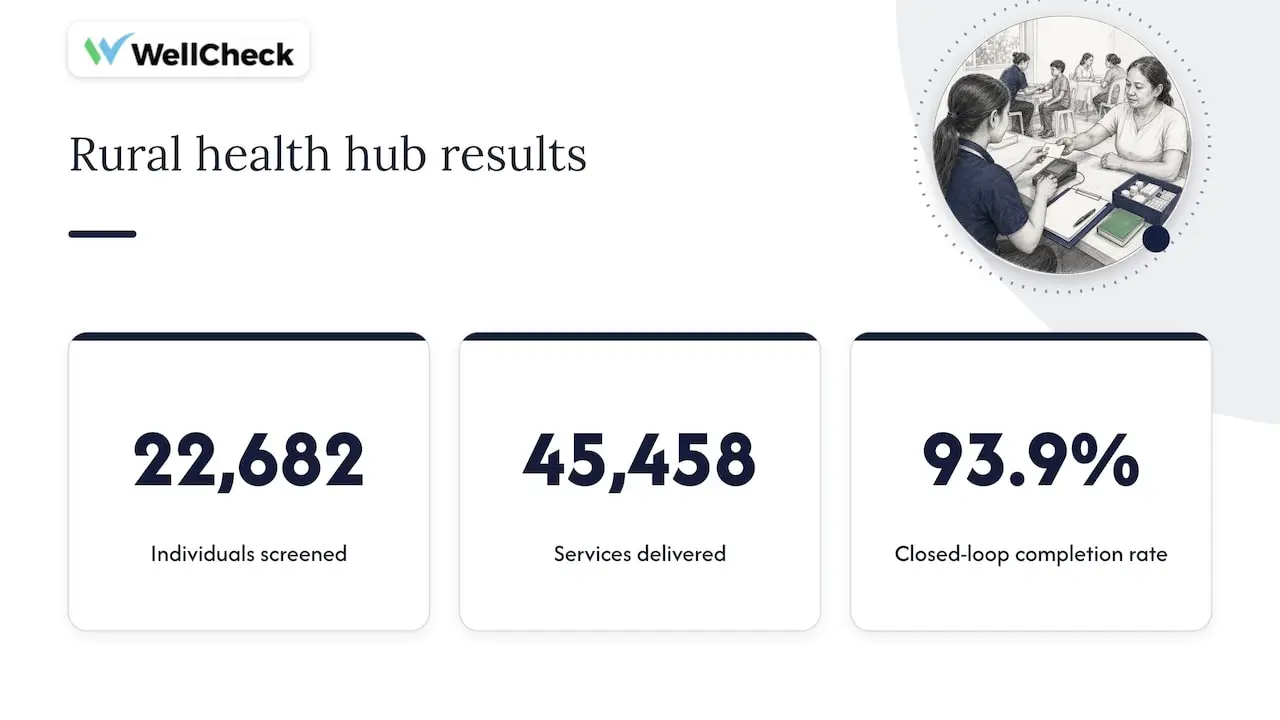
EquiLoop is not a resource directory. Its purpose is to track what happened after a referral was made. In one rural health hub deployment with a multi-partner ecosystem, 22,682 individuals were screened, 45,458 services were delivered and the closed-loop completion rate was 93.9%.*
If your program is looking at digital credentials and also needs to show follow-through to funders, you can see how the workflow fits together on the EquiLoop page or in the closed-loop referral walkthrough.
To talk through your own pathways and reporting requirements, book a 30-minute demo.
*Rural health hub deployment with a multi-partner ecosystem. Includes both clinical and social services referrals.
Common mistakes to avoid
- Treating the card as the program. The card is one output. The program is the screening, referral and follow-up behind it.
- Skipping the owner for the signing key. Unowned keys expire, get lost or get copied.
- Testing only on one phone. Verifier apps and wallets behave differently across devices.
- Putting extra data on the card. If it does not belong under the US content guidance, leave it off.
- Forgetting residents without phones. Always keep a paper path.
- Launching without a verifier policy. Staff need to know which issuers to accept and what to do when a card fails.
FAQ
What is a SMART Health Card?
It is a signed data artifact for health details modeled with FHIR, designed for a person to store and present, often as a QR code. In the US it should contain only legal name, date of birth and clinical information such as a vaccination or test result. Anyone scanning it can confirm the data is unchanged and came from the issuer.
Do we need to replace our EHR to issue SMART Health Cards?
No. Issuance works from FHIR-modeled data, and you can offer the $health-cards-issue operation or provide QR codes and file downloads. Start by asking your record system vendor what it already supports, then test the output with the federal Inferno test kit.
How is a SMART Health Card different from a SMART Health Link?
A card holds a small, verified set of data in the code itself. A link is for data that is too large or changes over time, and it supports encrypted cloud storage, passcodes and expiration. Choose by the data you need to share, not by which sounds newer.
Can a SMART Health Card track whether a referral was completed?
No. A card proves a fact at the time it was issued. Tracking whether a referral was accepted, delivered and resolved needs a workflow system with status history and reporting, which is what a closed-loop referral platform provides.
What should we test before launch?
Run the Inferno SMART Health Cards Test Kit against file downloads, the issue operation and QR codes. Then scan real cards, including printed ones, with several verifier apps on iPhone and Android.
Sources
- SMART Health Cards Framework
- How SMART Health Cards Work
- SMART Health FAQ
- SMART Health Cards, CommonHealth
- HL7 FHIR Implementation Guide: SMART Health Cards Vaccination and Testing
- Issue Verifiable Credential operation definition
- Inferno SMART Health Cards Test Kit
- SHL Protocol Specification
