
For UDS purposes, SDOH reporting means one thing: counting how many patients were screened for social risks and how many screened positive in four required categories. Health centers report those counts on the Health Information Technology (HIT) form. The UDS does not ask whether a referral was accepted, delivered, or resolved. Funders and payers increasingly do, so a health center needs two things: accurate UDS counts for HRSA, and its own record of what happened after each screen.
This guide covers what the UDS asks for, how to map your screening tool to it, the errors that most often distort the numbers, and how to build the follow-through data the UDS leaves out.
TL;DR
- The 2025 UDS Manual (reports due February 15, 2026) has health centers report the total patients screened for social risks and the number positive for food insecurity, housing insecurity, financial strain, and lack of transportation.
- Use a standardized screener and HRSA’s official crosswalk to decide which responses count as a positive screen. Custom questions are a common source of misreporting.
- Do not count demographic data such as ZIP code or insurance status as a social risk screening.
- The UDS records screening and positives only. It does not capture referral status or resolution, so closed-loop tracking has to come from a separate workflow.
Table of Contents
- What the UDS asks about social risk
- Choose a screener that maps to the four categories
- Common SDOH reporting errors
- Where UDS reporting stops and accountability begins
- Stratify the data to see who is being missed
- Rural and multi-partner settings: what changes
- UDS+ and patient-level reporting
- A workable annual rhythm
- Tracking referrals after the screen with EquiLoop
- FAQ
- Sources
What the UDS asks about social risk
The Uniform Data System is the standard annual data set that Health Center Program grantees and look-alikes report to HRSA. It covers patient characteristics, services, clinical processes and outcomes, costs, and revenues. The 2025 manual estimates an average of 238 hours per response, which is a useful reminder of how much of your year this report consumes.
Social risk data sits on Appendix D, the Health Center Information Technology (HIT) Capabilities form. HRSA’s appendices page lists Appendices D, E, and F (HIT capabilities, other data elements, and workforce) as forms you must submit alongside the tables. In practice, the social risk questions ask for:
- The total number of patients screened for social risks.
- Of those, the number who screened positive for food insecurity.
- The number positive for housing insecurity.
- The number positive for financial strain.
- The number positive for lack of transportation.
Those four categories are the required ones. Your health center may screen for more (interpersonal safety, utilities, social isolation), and you should, if your community needs it. Those extra domains simply do not appear in the UDS counts.
How the UDS counts differ from your internal data
The UDS is a count of patients at a point in time across a year. It is not a log of individual needs, and it carries no information about what you did next. The table shows the gap.
| Question | Answered by UDS HIT form | Needs separate tracking |
|---|---|---|
| How many patients were screened? | Yes | |
| How many screened positive in each of the four categories? | Yes | |
| Was a referral made for each positive screen? | No | Yes |
| Did the community partner accept it? | No | Yes |
| Was the need resolved, and how long did it take? | No | Yes |
| Which partners are not responding? | No | Yes |
The HRSA UDS webinar on counting visits and patients is the right place to confirm what counts as a reportable visit. The key point for SDOH is that the form collects the screening and the positive result, and stops there.
Choose a screener that maps to the four categories
HRSA’s guidance is to use standardized screening tools. Tools commonly cited include PRAPARE, the Accountable Health Communities (AHC) Health-Related Social Needs Screening Tool, WellRx, and the Hunger Vital Sign. HRSA publishes a crosswalk of standardized social risk screeners (updated August 2023) that shows which question on each screener corresponds to each of the four categories on Question 12a of the HIT form.
Two details in that crosswalk matter for your workflow:
- Not every screener has a question for every category. Where there is no relevant question, the crosswalk says so. If your tool has no transportation item, for example, you cannot report a transportation count from it without adding one.
- The question numbers refer to the screener itself, and not all screeners are numbered, so your build team needs to match wording, not just numbers.
Health centers most often misreport when they write their own questions. A homegrown item such as “Do you ever have trouble getting around?” may be clinically useful, but nobody can say whether a yes response is a positive screen for lack of transportation under the UDS. If you have custom questions, keep them, and add or map the standardized items so the UDS count is defensible. Using the crosswalk is the clearest way to keep reported positives aligned with what HRSA expects.
Set the rule once, in the build
Do not leave the positive-screen definition to each clinician or to whoever pulls the report. Document, per screener and per category, which response triggers a positive. Build it into the EHR flowsheet or screening form as a discrete field. When HRSA reviewers or your own board ask how a number was produced, you can answer with a written rule instead of a recollection.
Common SDOH reporting errors
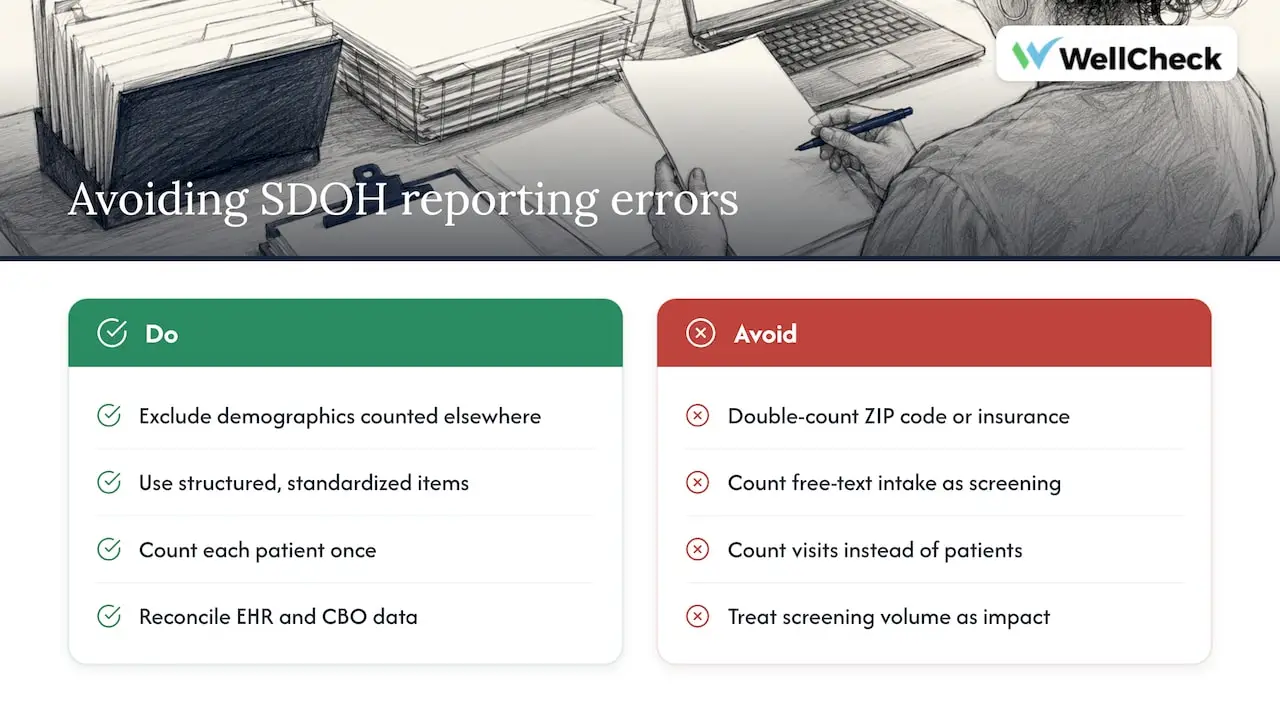
The errors below recur across health centers. Most are definition problems, not software problems.
Counting demographics as screening. HRSA guidance covers social risk screening conducted outside standard demographic data. Items such as ZIP code or insurance status are already counted elsewhere in the UDS. Reporting them again as social risk screening double-counts and inflates the screened total.
Mixing routine intake with UDS-eligible screening. A front-desk intake form may collect housing status in a free-text field. Unless it is a structured, standardized screening item mapped to the four categories, it does not belong in the count.
Counting screenings instead of patients. A patient screened at three visits is one patient in a patient-based count. Confirm with your EHR vendor or data team how the report de-duplicates, and test it against a sample chart review.
Treating a high screening rate as proof of impact. Screening volume tells HRSA that you screened. It tells a funder nothing about whether a family with a positive food insecurity screen received food. That is the gap the next section addresses.
Siloed data across sites. Clinical sites often keep screening data in the EHR, while community-based organizations (CBOs) use different tracking systems. The results rarely reconcile without deliberate design. Per the CMS Accountable Health Communities findings on cross-sector data sharing, the largest barrier was weak interoperability between clinical EHRs and CBO case management systems, and CBOs were often asked to join multiple referral systems that did not align with their own.
Where UDS reporting stops and accountability begins
A positive screen is a need identified. It is not a need met. HRSA’s form takes the first and not the second, and many programs mistakenly assume that submitting screening counts satisfies a funder’s closed-loop requirement. It does not. Showing that a referral was sent, accepted, and resolved takes infrastructure beyond the standard EHR.

This matters for a practical reason. Staff are often reluctant to screen for needs they cannot resolve, and practitioners describe that hesitation as an ethical tension: asking patients about hunger or housing without a reliable route to help can feel hollow. Tracking the full life of a referral, from screen to outcome, is how a program shows it takes the question seriously and produces the evidence funders ask for. The HRSA webinar materials cover how visits and patients are defined, and the same logic applies here: you can only report cleanly on what you define and track at the point of care.
The follow-through data a program should capture
For each positive screen, a closed-loop workflow should record:
- The need identified and the screener item behind it.
- Whether the patient consented to a referral.
- The partner the referral was routed to, and the date sent.
- Whether the partner accepted it, and when.
- The service delivered, or the reason it was not.
- The date and status at closure: resolved, unresolved, patient declined, or unable to reach.
- Who is responsible for the next action if a step stalls.
That list is your internal operating record. Rolled up, it produces the numbers a funder wants: referral acceptance rate, time to service, and completion rate by need type and by partner.
For reference, the following figures come from a single deployment of EquiLoop: 22,682 individuals screened; 45,458 services delivered; and a 93.9% closed-loop completion rate. Footnote: Rural health hub deployment with a multi-partner ecosystem. Includes both clinical and social services referrals. These are program-level results from one multi-partner setting and not a benchmark for any other organization.
Stratify the data to see who is being missed
Volume reporting hides inequity. The CMS AHC findings describe bridge organizations, including rural health networks, that stratified SDOH data by payer, race, ethnicity, and federal poverty level to find the specific drivers of inequity in their communities. That moved their reporting from counting activity to informing decisions about structure and resource allocation.
You can do the same at a health center scale. Once screening and referral outcomes sit in one record, ask:
- Do patients on Medicaid or without insurance complete referrals at a different rate than commercially insured patients?
- Is housing referral completion lower in one county or at one site?
- Which partner has the longest gap between referral and acceptance?
These questions are only answerable when status data exists for every referral, not just the ones someone remembered to follow up.
Rural and multi-partner settings: what changes
Rural health networks and AHEC-linked programs face a particular version of the problem. Partners are few, spread across wide geography, and often small. A food pantry run by volunteers cannot log into three different referral portals. The same CMS findings note that CBOs are overwhelmed by the burden of multiple non-aligned referral systems, and that successful programs relied on a unified, locally configurable referral infrastructure that bridges systems instead of manual tracking methods.
Practical implications:
- Keep partner-side data entry minimal. A status update should take seconds.
- Map to the partner network you already have. A tool that assumes a dense urban directory will not fit.
- Keep the EHR as your system of record for clinical data, and connect the referral workflow to it rather than duplicating it.
- Plan for reporting that serves more than one audience: HRSA for the UDS, and separately any state, payer, or foundation funders with their own outcome definitions.
Data governance differs by country as well. Some jurisdictions, such as France, maintain a dedicated certification framework for hosting health data. In the United States, your obligations come from HIPAA and your own agreements, so document who can see which fields, especially when CBO partners are not covered entities.
UDS+ and patient-level reporting
HRSA is also moving toward patient-level submission. Its FY25 Health Center Controlled Network objectives include increasing the percentage of health centers that submit some or all disaggregated patient-level data in UDS+ reports, supported by UDS+ readiness activities. If your center participates, structured, discrete social risk fields become more valuable: patient-level data cannot be built from free-text notes. Confirm current requirements and timelines with your HRSA project officer or your HCCN, because these programs change.
A workable annual rhythm
Reporting in a single February sprint is how errors survive. A steadier approach:
- Quarterly: run the screening and positive counts by site, and compare them with the previous quarter. Investigate any site where the screened count jumps or drops sharply.
- Quarterly: pull referral status data. Look at open referrals older than your target window and assign them.
- Before year end: re-check the screener-to-category mapping against the current HRSA crosswalk and the current UDS Manual, since definitions can be updated.
- At submission: reconcile UDS counts with your internal records and keep the documented rules with the submission file.
- After submission: review what HRSA’s edits flagged, and fix the source of each issue in the build instead of correcting it once.
For related workflows, see our guide on meeting CMS timelines with an SDOH screening workflow and our notes on HRSA grant reporting checks. Programs that also report to payers may find SDOH screening mandates useful context.
Tracking referrals after the screen with EquiLoop
WellCheck builds EquiLoop for the part of the work the UDS does not cover. It manages SDOH screening and intake, referral routing to clinical and community partners, follow-up and status tracking, outcomes dashboards, and funder-ready reporting. Each deployment is configured around the partner network, referral pathways, and reporting requirements your organization already has, and it is designed to work alongside your existing systems of record, not replace them.
EquiLoop is not a resource directory. Its purpose is workflow and accountability: knowing what happened after the referral was made. If you want to see how that would look for your sites, read about EquiLoop, review the FQHC and hospital one-sheet, or book a 30-minute demo.
If you are comparing categories of tools first, our overview of healthcare referral management software lays out the criteria, and our piece on closed-loop referral systems and community health equity explains the workflow in more depth.
FAQ
Which social risks must be reported in the UDS?
Health centers report the total patients screened for social risks and the number who screened positive for food insecurity, housing insecurity, financial strain, and lack of transportation, per the 2025 UDS Manual. The counts go on the HIT Capabilities form. Additional domains you screen for are not part of the required counts.
Can we use our own screening questions for UDS reporting?
You can use them clinically, but the UDS counts should rest on standardized screeners mapped through the HRSA crosswalk. Custom questions make it hard to show that a reported positive meets the category definition. Add or map standardized items so each of the four categories is covered.
Does the UDS track whether a referral was completed?
No. The HIT form collects patients screened and patients positive, not referral status or resolution. To show that a referral was sent, accepted, and resolved, you need a closed-loop referral workflow that exchanges status with community partners.
Do ZIP code and insurance status count as social risk screening?
No. HRSA guidance directs health centers to report social risk screening conducted outside standard demographic data, since items like ZIP code and insurance status are already reported elsewhere in the UDS. Counting them again is one of the most common double-counting errors.
Sources
- Uniform Data System 2025 Manual, HRSA
- Crosswalk of Standardized Social Risk Factor Screeners, HRSA
- The Foundation of the UDS: Counting Visits and Patients, HRSA
- UDS Appendices, HRSA
- FY25 HCCN Objectives and Sample Activities, HRSA
- Cross-sector data sharing findings, CMS Accountable Health Communities Model
